

OCI Compute Instance Creation
Step 1 — Navigate to Compute Instances
OCI Console → Compute → Instances
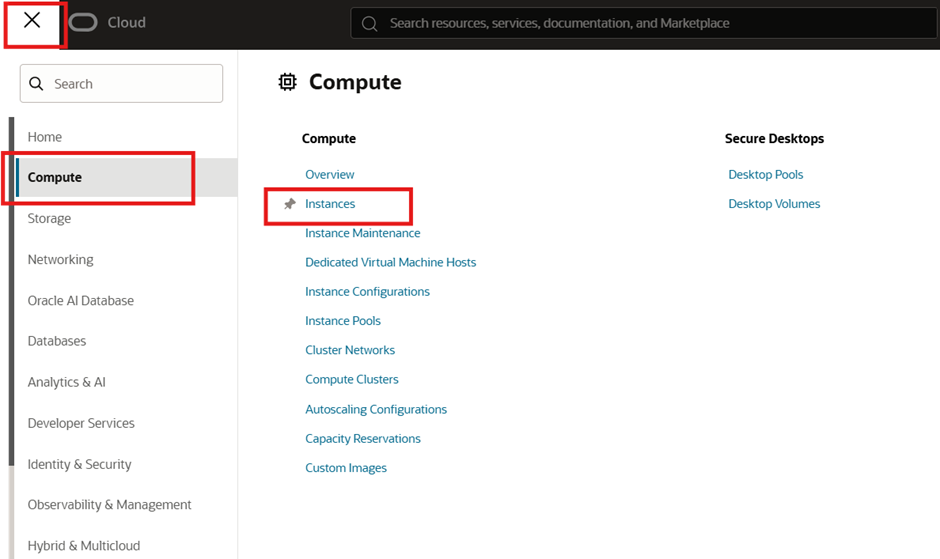
What this section is used for
- Creating Virtual Machines (VMs)
- Managing instance lifecycle (start, stop, reboot, terminate)
- Viewing IPs, shapes, availability, and fault domains
Best practice
- Always verify the region and compartment before creating instances.
Step 2 — Select Compartment and Click “Create Instance”
Action
- Ensure Compartment = Compute-Comp
- Click Create instance
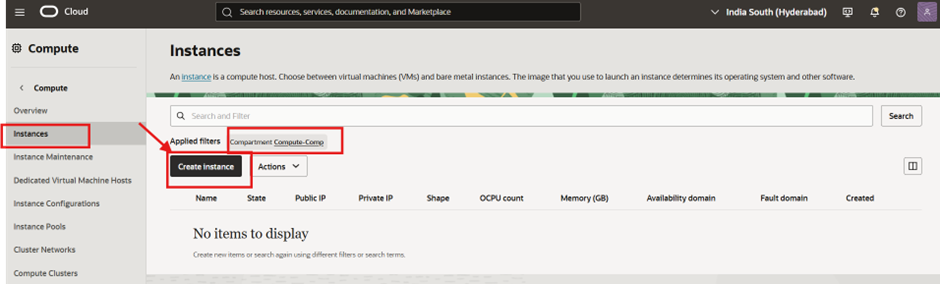
Why compartment matters
- Compute instances should live in a dedicated compute compartment
- Makes IAM policies, auditing, and cost tracking much cleaner
Step 3 — Basic Information
Instance Name
Name: Anish-Lab-Instance
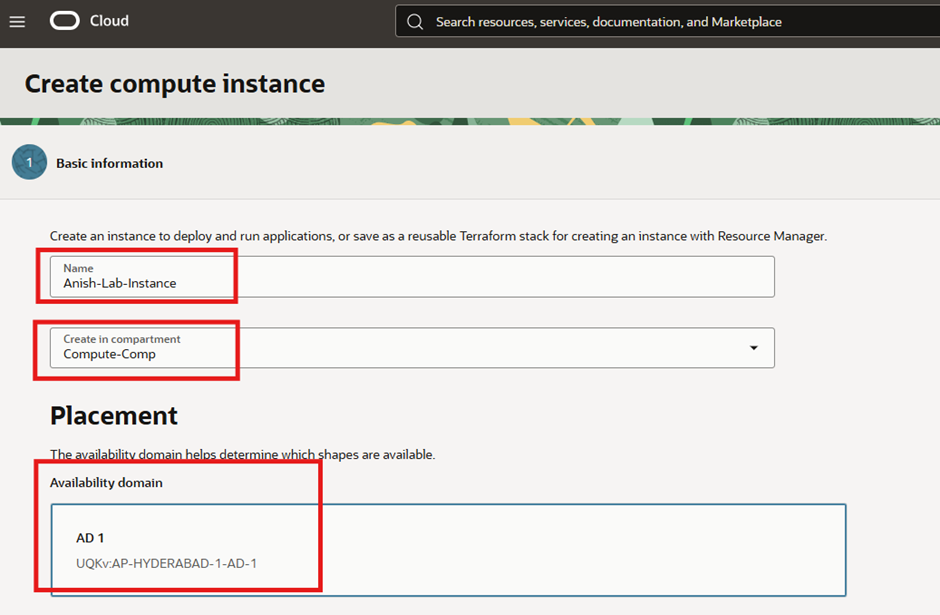
Compartment
- Create in compartment:
Compute-Comp
Use a naming convention that reflects:
- Environment (Lab / Dev / Prod)
- Purpose (Web / DB / Bastion)
- Region or VCN if needed
Example:
lab-web-01 prod-db-01
Step 4 — Placement (Availability Domain)
Availability Domain
- AD:
AD-1 (UQKv:AP-HYDERABAD-1-AD-1)
What Availability Domain means
- An AD is a physically isolated data center within a region
- OCI regions typically have 3 Availability Domains
Design recommendation
- Single instance → any AD is fine
- HA design → distribute instances across multiple ADs
Step 5 — Capacity Type Selection
Selected Capacity Type
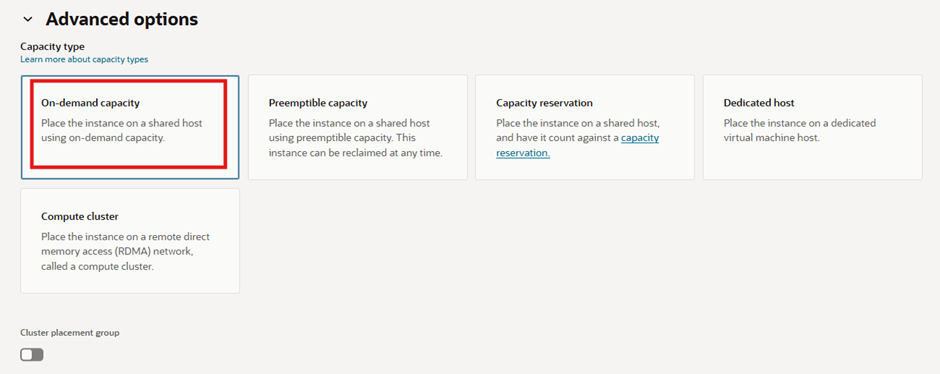
-On-demand capacity
This determines how OCI allocates physical capacity for your instance.
Capacity Types Explained
| Capacity Type | Definition | Host Placement | Availability Guarantee | Interruption Behavior | Cost Level | Typical OCI Use Case |
|---|---|---|---|---|---|---|
| On-demand capacity | Standard compute capacity allocated at launch | Shared physical host | Generally reliable | Runs continuously unless manually stopped | Standard | Production servers, databases, bastion hosts |
| Preemptible capacity | Uses spare OCI capacity | Shared physical host | No guarantee | Can be terminated at any time without notice | Low | CI/CD runners, batch jobs, dev/test workloads |
| Capacity reservation | Capacity reserved in advance | Shared physical host | Guaranteed | No interruption due to capacity shortage | Standard | Business-critical workloads, peak scaling |
| Dedicated host | Entire physical server for one tenant | Dedicated physical host | Guaranteed | No interruption | High | License-restricted, compliance workloads |
| Compute cluster | RDMA-enabled high-performance cluster | HPC cluster | Guaranteed | No interruption | High | HPC, ML training, parallel workloads |
Why On-demand here
- Best default for:
- Labs
- Long-running services
- Predictable workloads
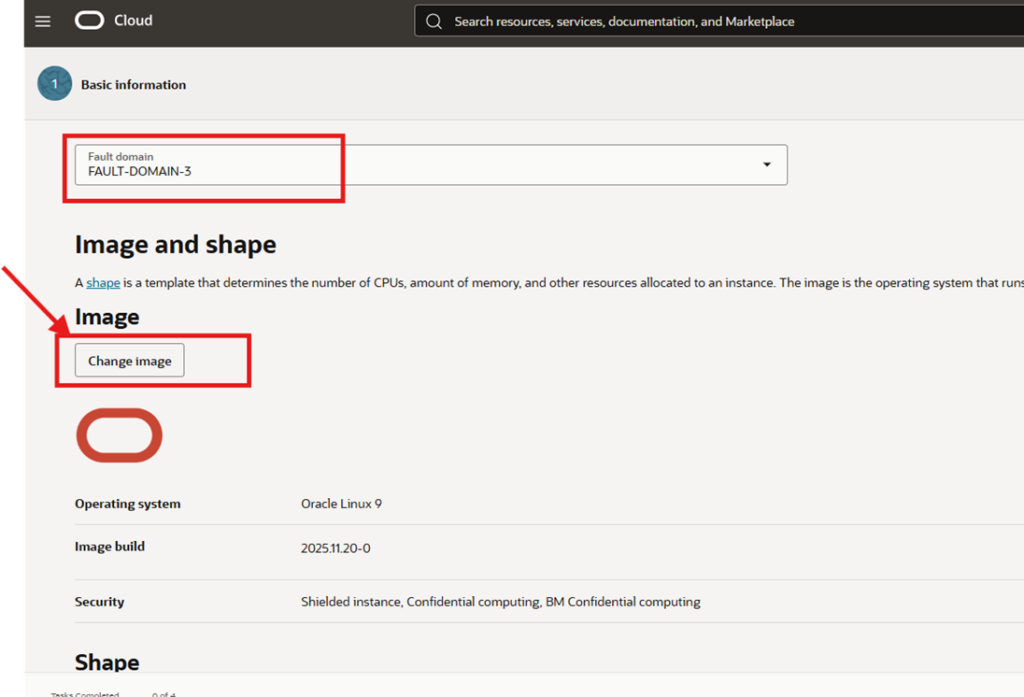
Step 6 — Fault Domain Selection
Fault Domain
- FAULT-DOMAIN-3
What Fault Domains are
- Logical groupings of hardware within an AD
- Protect against:
- Rack failures
- Power or network disruptions
Best practice
- Spread multiple instances across different fault domains
Step 7 — Image Selection (Operating System)
Action
Click Change image
Select Oracle Linux
Why Oracle Linux
- Fully supported by OCI
- Optimized kernel
- No licensing cost
- Best integration with OCI services
Other supported options:
- Ubuntu
- Red Hat
- Rocky Linux
- Windows
- Marketplace images
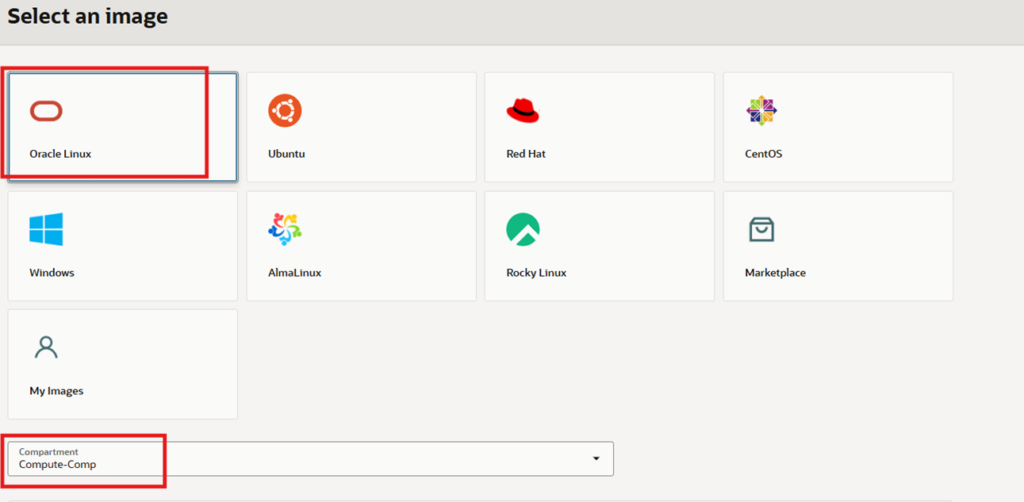
- OCI-native workloads → Oracle Linux
- Kubernetes / cloud-native → Oracle Linux or Rocky Linux
Step 8 — Shape Selection (Compute Size)
Instance Type
- Virtual Machine
Difference
- Virtual Machine → shared infrastructure (most common)
- Bare Metal → full physical server (specialized use cases)
Step 9 — Shape Series Selection
Selected Series
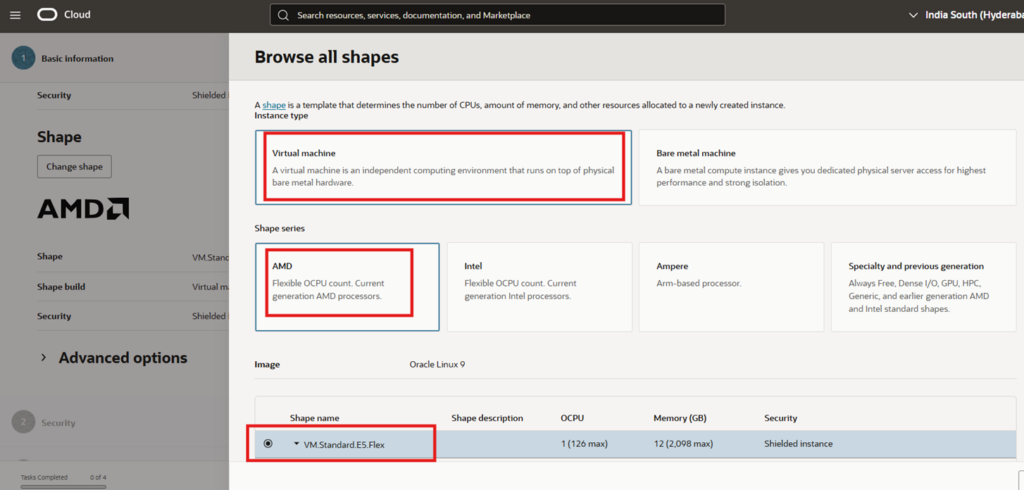
- AMD (Flexible OCPU)
Why AMD Flexible shapes
- Cost-effective
- Flexible CPU and memory
- Excellent price-to-performance ratio
Alternatives:
- Intel → Intel-optimized workloads
- Ampere → ARM-based cloud-native workloads
Step 10 — Shape Name
Selected Shape
VM.Standard.E5.Flex
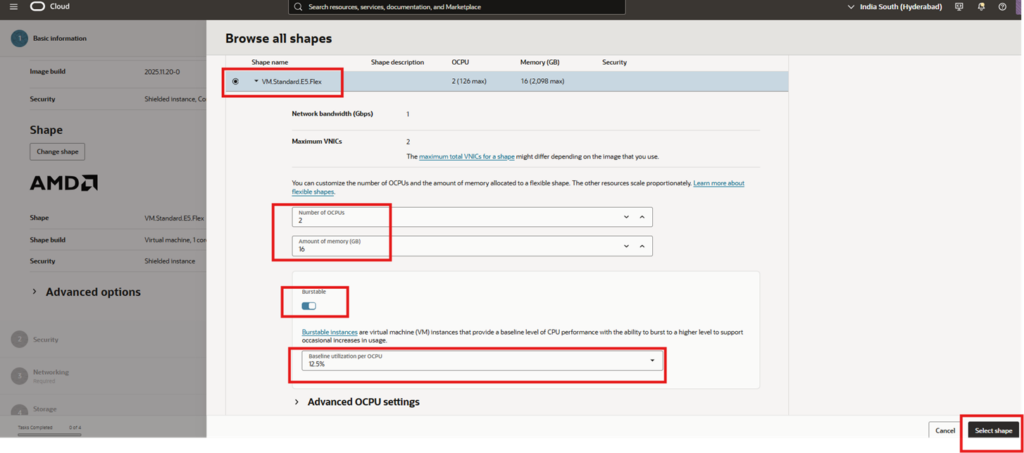
Why this shape
- Flexible OCPU and memory
- Suitable for:
- Application servers
- Databases
- Middleware
Step 11 — Customize OCPU & Memory
Configuration
- OCPUs: 2
- Memory: 16 GB
How flexible shapes work
- Memory scales with CPU
- OCI enforces min/max ratios
- Resources can be resized later without rebuilding the VM
Step 12 — Burstable Option
Burstable Configuration
- Enabled
- Baseline utilization per OCPU: 12.5%
What burstable means
- VM runs at baseline CPU
- Can burst to higher CPU when credits are available
Ideal for
- Lab
- Development
- Low-traffic workloads
Avoid burstable for
- Databases
- Latency-sensitive production systems
Step 13 — Availability Configuration
Selected Option
Architecture Context
VCN ├── Public Subnet │ └── Bastion / Web VM (Public IP) └── Private Subnet └── App / DB VM (Private IP + NAT)
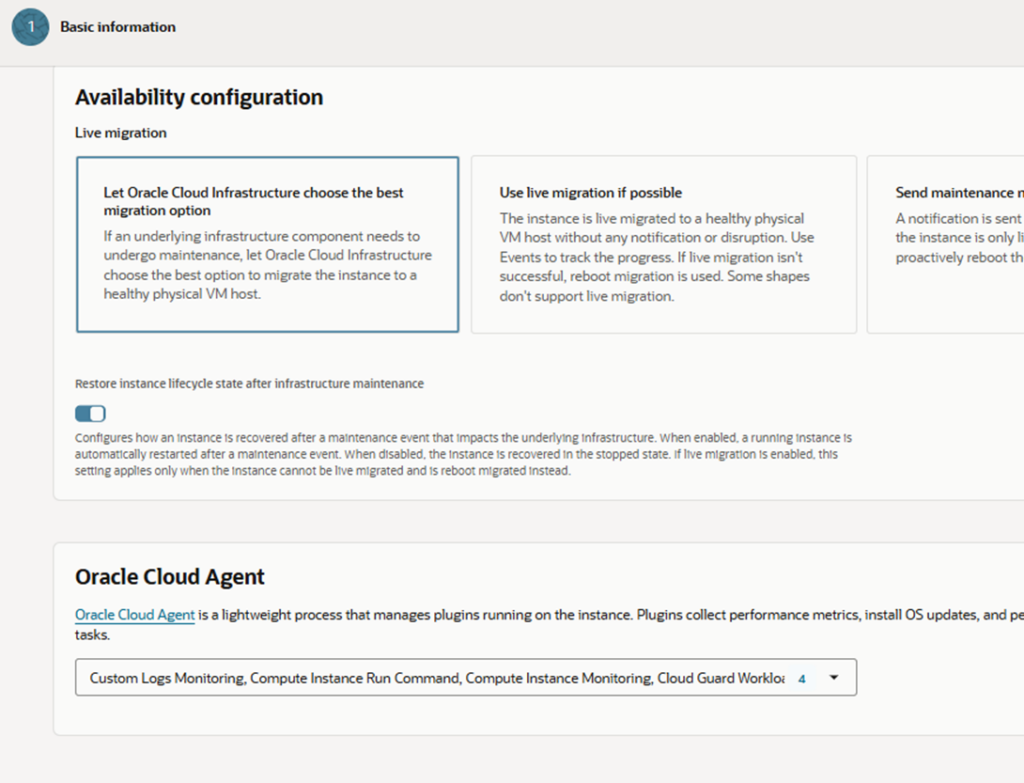
Step 14 – Availability Configuration & OCI Agent Plugins
Availability Configuration – Live Migration
Selected Option:
Let Oracle Cloud Infrastructure choose the best migration option
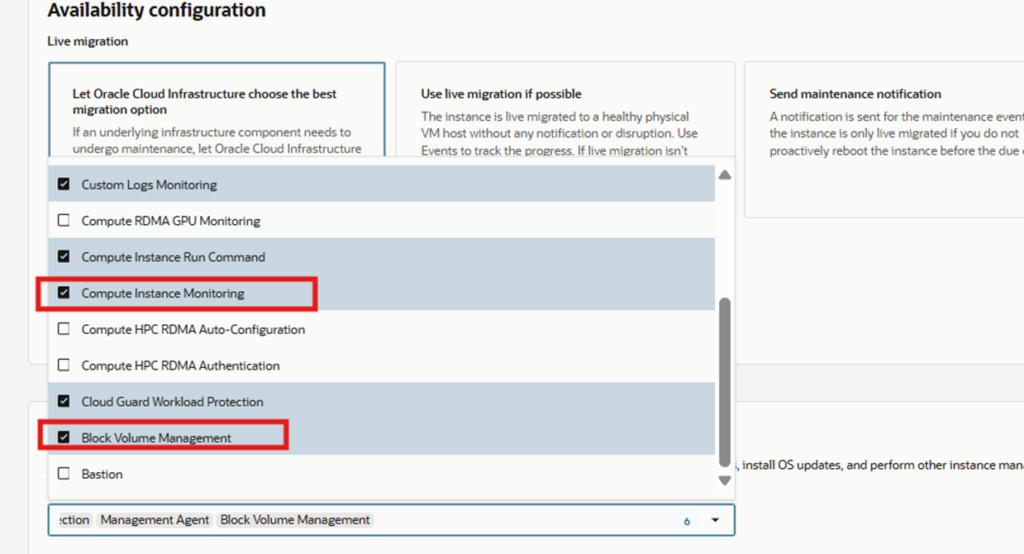
Explanation:
- OCI automatically decides the safest migration method during infrastructure maintenance.
- If the selected shape supports live migration, the instance is migrated without downtime.
- If live migration is not supported, OCI performs a controlled reboot migration.
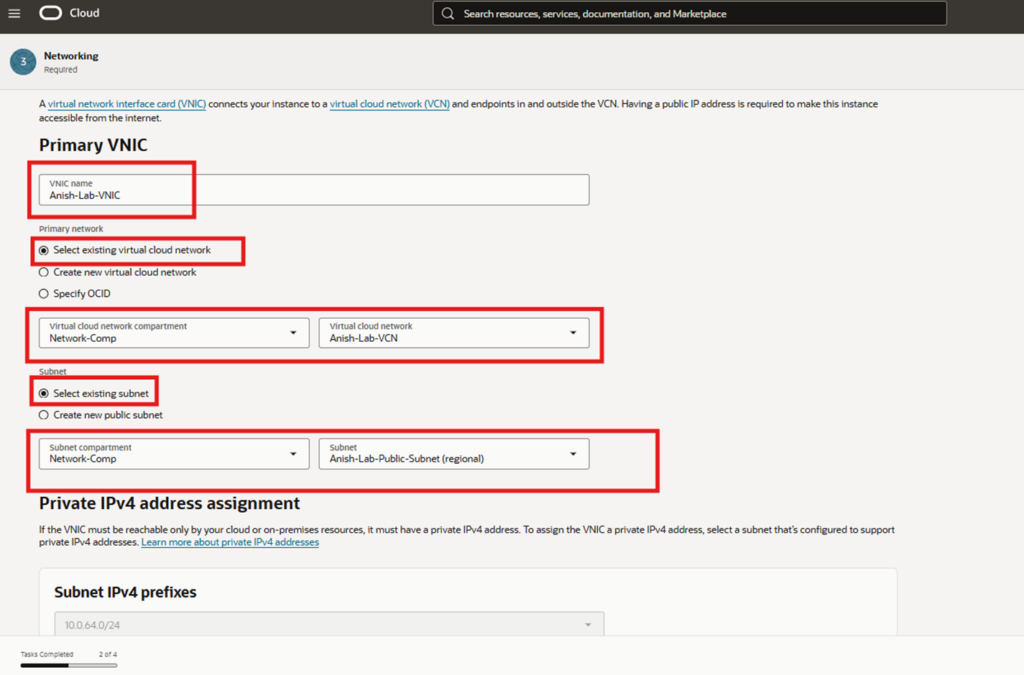
Step 15 : Networking – Primary VNIC Configuration
Primary VNIC Details
| Parameter | Value |
|---|---|
| VNIC Name | Anish-Lab-VNIC |
| VCN Selection | Select existing VCN |
| VCN | Anish-Lab-VCN |
| Subnet Selection | Select existing subnet |
| Subnet | Anish-Lab-Public-Subnet (Regional) |
Explanation:
- A VNIC (Virtual Network Interface Card) connects the compute instance to the VCN.
- Using a public subnet allows assignment of a public IP address.
Private IPv4 Address Assignment
- OCI automatically assigns a private IPv4 address from the subnet CIDR.
- This IP is used for internal VCN communication.
- Public access is handled independently via a public IP.
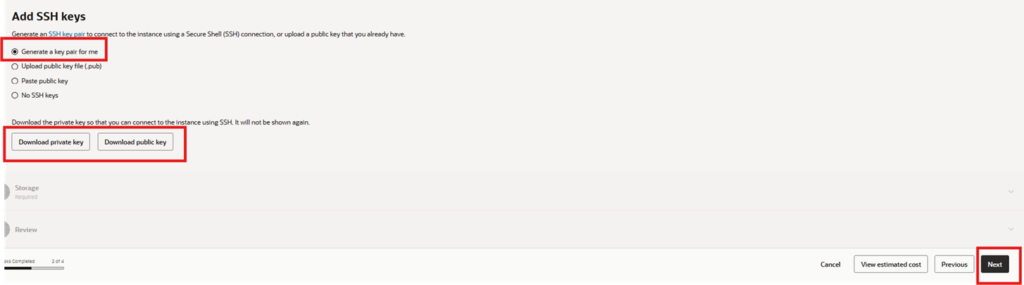
Design Note:
- Public IPs can change; private IPs remain stable.
- Applications should rely on private IPs for internal communication.
Step 15 : Storage – Boot Volume Configuration
Boot Volume Settings
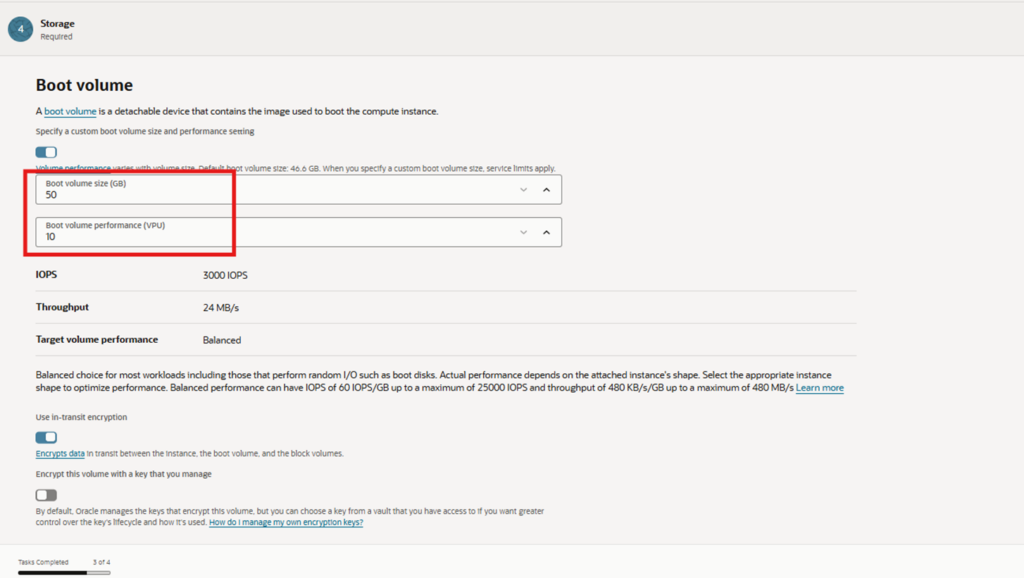
| Parameter | Value |
|---|---|
| Boot Volume Size | 50 GB |
| VPU (Volume Performance Units) | 10 |
| IOPS | ~3000 |
| Throughput | ~24 MB/s |
| Performance Tier | Balanced |
Explanation:
- Balanced performance is suitable for OS and general-purpose workloads.
- Boot volume performance scales with volume size and VPUs.
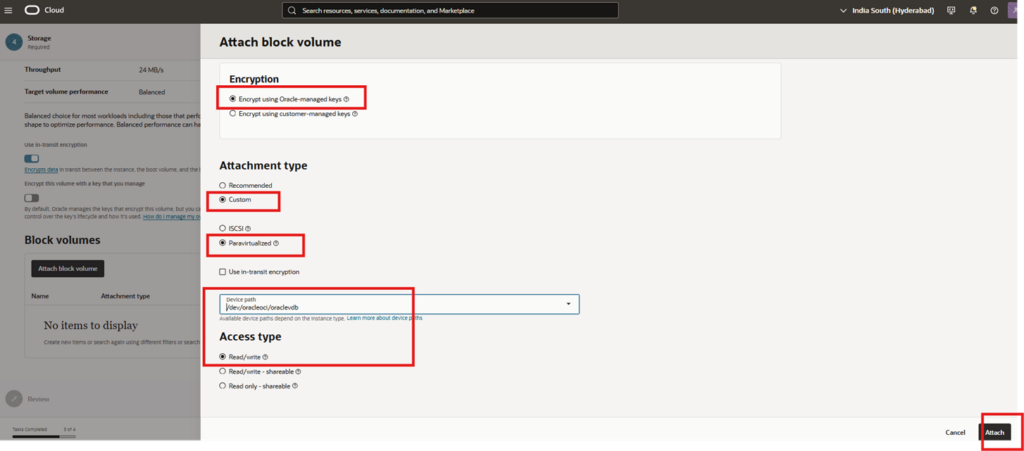
Encryption
- Encryption enabled using Oracle-managed keys.
- Data is encrypted at rest by default.
Security Best Practice:
- Oracle-managed keys are sufficient for most workloads.
- Customer-managed keys can be used for compliance-driven environments.
Step 16 : Additional Block Volume Attachment
Block Volume Creation
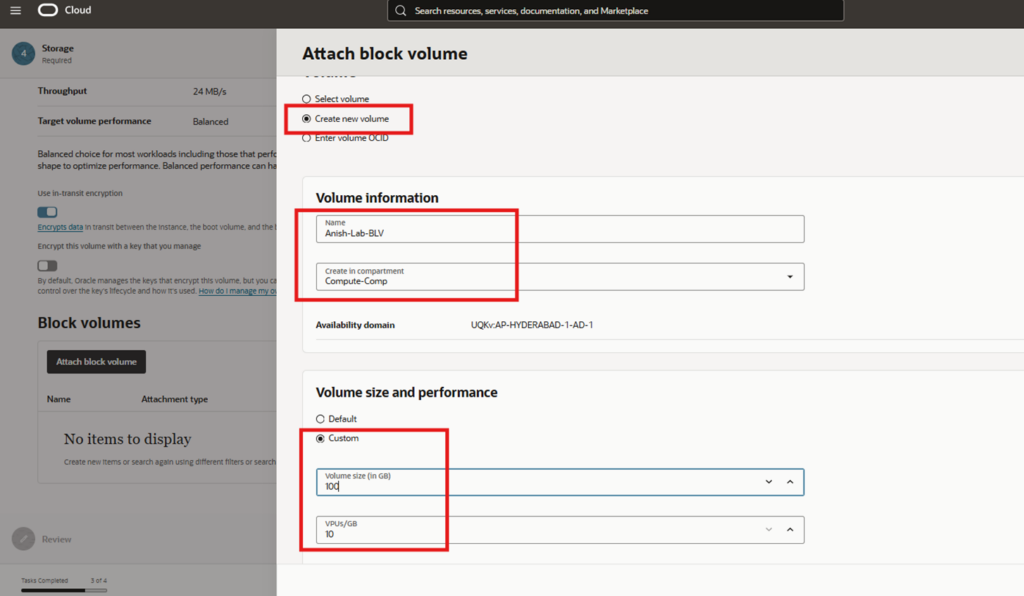
| Parameter | Value |
|---|---|
| Volume Name | Anish-Lab-BLV |
| Size | 100 GB |
| VPU/GB | 10 |
| Availability Domain | Same as instance |
Block Volume Attachment Configuration
| Setting | Value |
|---|---|
| Encryption | Oracle-managed keys |
| Attachment Type | Custom |
| Mode | Paravirtualized |
| Device Path | /dev/oracleoci/oraclevdb |
| Access Type | Read/Write |
Why Paravirtualized Attachment:
- Lower latency and better performance than iSCSI.
- Recommended for most Linux workloads.
Final Validation: Instance & Networking Summary
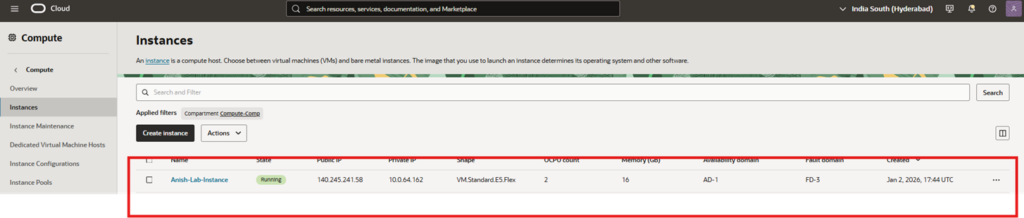
Compute Instance Details
| Attribute | Value |
|---|---|
| Instance Name | Anish-Lab-Instance |
| State | Running |
| Shape | VM.Standard.E5.Flex |
| OCPUs | 2 |
| Memory | 16 GB |
| Availability Domain | AD-1 |
| Fault Domain | FD-3 |
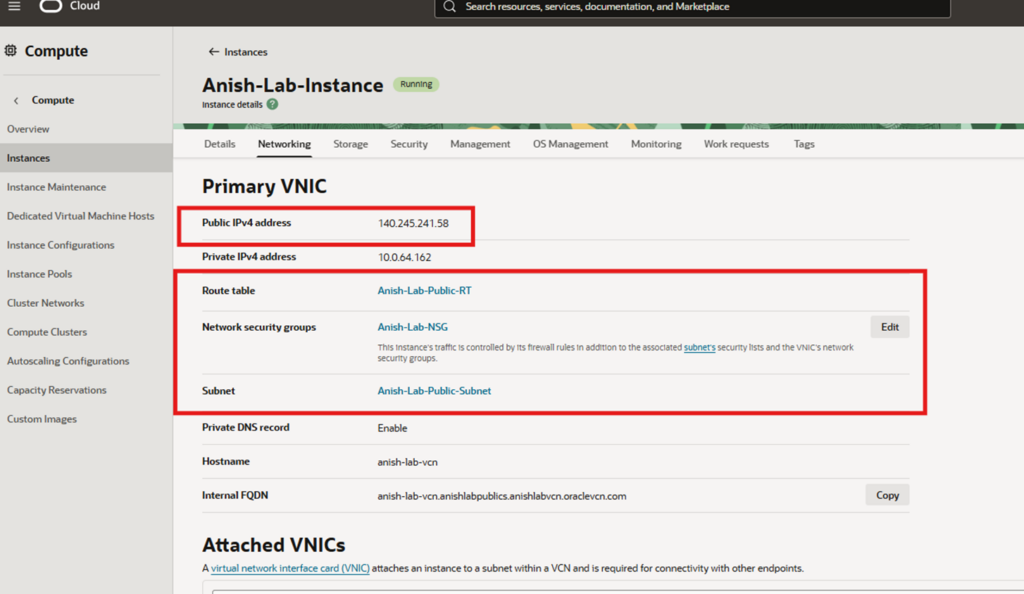
Primary VNIC & Networking Details
| Component | Value |
|---|---|
| Public IPv4 Address | 140.245.241.58 |
| Private IPv4 Address | 10.0.64.162 |
| Subnet | Anish-Lab-Public-Subnet |
| Route Table | Anish-Lab-Public-RT |
| Network Security Group | Anish-Lab-NSG |
| VCN | Anish-Lab-VCN |
Traffic Flow Overview
Internet
|
Internet Gateway
|
Public Route Table
|
Public Subnet
|
Primary VNIC
|
Compute Instance



wish you best and best
Great perspective here. It gave me a new way to think about this topic.
Great read! Learned a lot from your clear explanation and examples.