
Internet ↓ Internet Gateway ↓ Public Route Table (0.0.0.0/0 → IGW) ↓ Public Subnet (10.0.64.0/24) ↓ Public Instances / LB
Step 1 — Create a Custom Route Table (Public Route Table)
Navigate to:
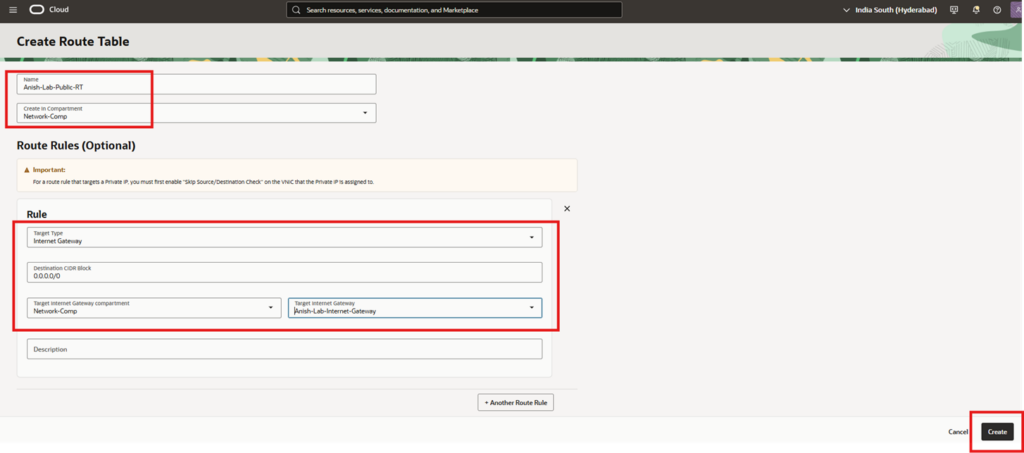
VCN → Routing → Create Route Table
Inputs Used
- Name: Anish-Lab-Public-RT
- Compartment: Network-Comp
Why a Separate Route Table?
Public and private subnets usually have different routing requirements Keeping route tables separate improves:
- Security
- Troubleshooting
- Scalability
Step 2 — Add Route Rule to Internet Gateway
- Allow internet-bound traffic from public subnet.
- Target Type: Internet Gateway
- Destination CIDR Block: 0.0.0.0/0
- Target Internet Gateway: Anish-Lab-Internet-Gateway
- Gateway Compartment: Network-Comp
What This Rule Means
0.0.0.0/0 = any destination outside the VCN
Traffic matching this rule is sent to the Internet Gateway & Without this rule Public subnet will not have internet access even if instances have public IPs
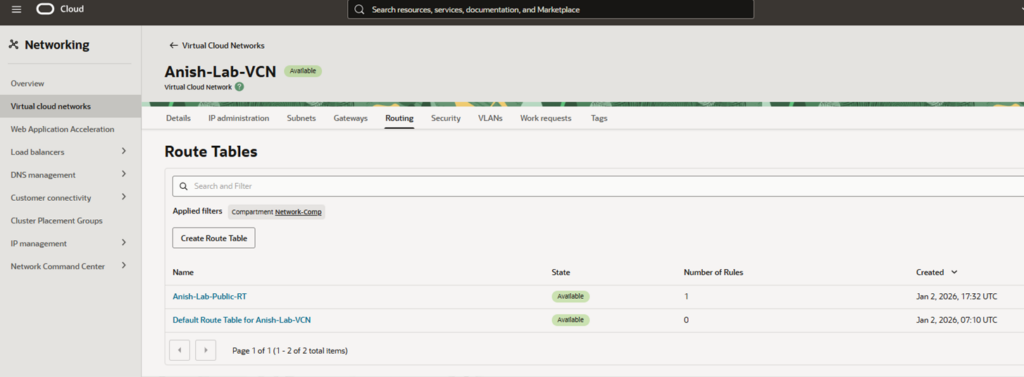
Step 3 — Verify Route Table Creation
Step 4 — Create Public Subnet
Create a subnet capable of hosting public-facing resources.
Navigate to VCN → Subnets → Create Subnet
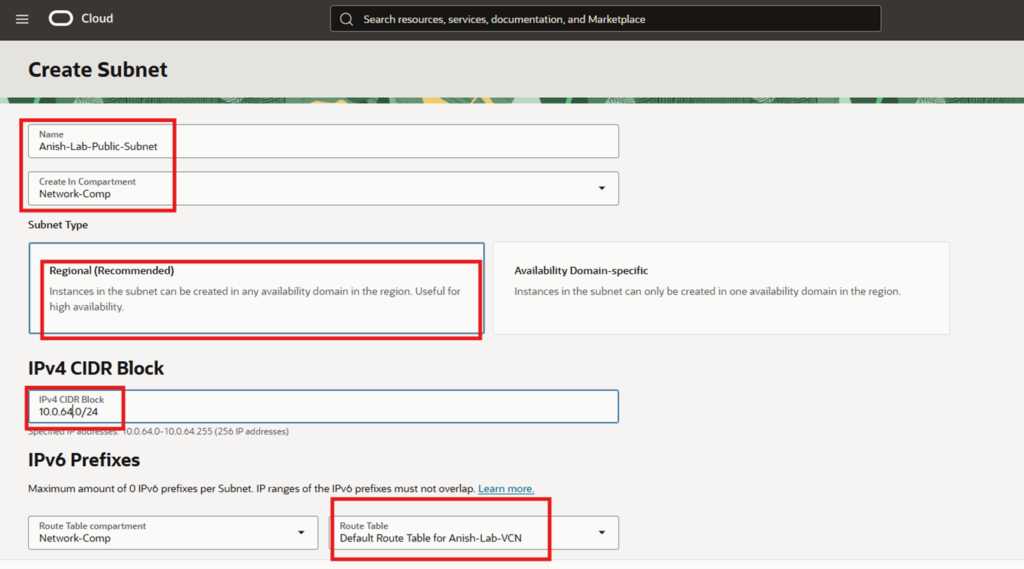
Step 5 — Configure Public Subnet Basics
- Name: Anish-Lab-Public-Subnet
- Compartment: Network-Comp
- Subnet Type: Regional (Recommended)
Why Regional Subnet?
Instances can be launched in any Availability Domain. AD-specific subnets are rarely used unless there is a strict requirement.
Step 6 — Assign IPv4 CIDR Block
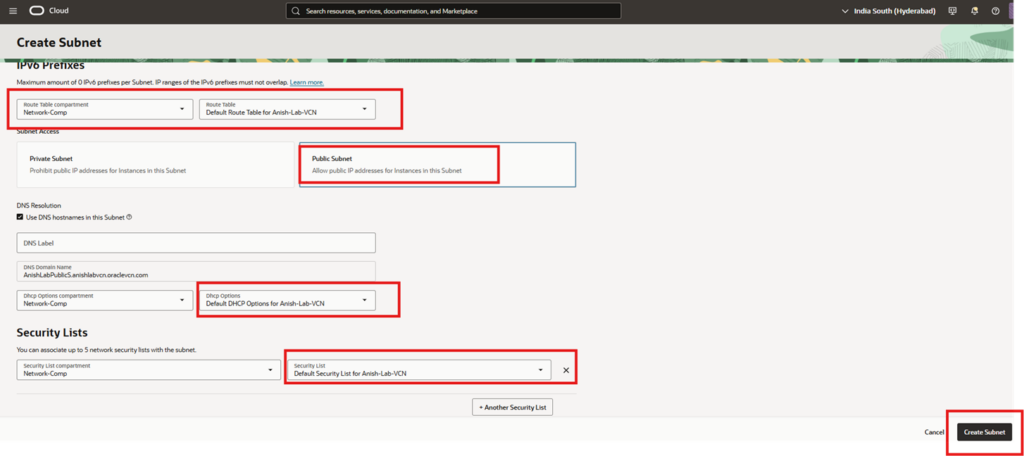
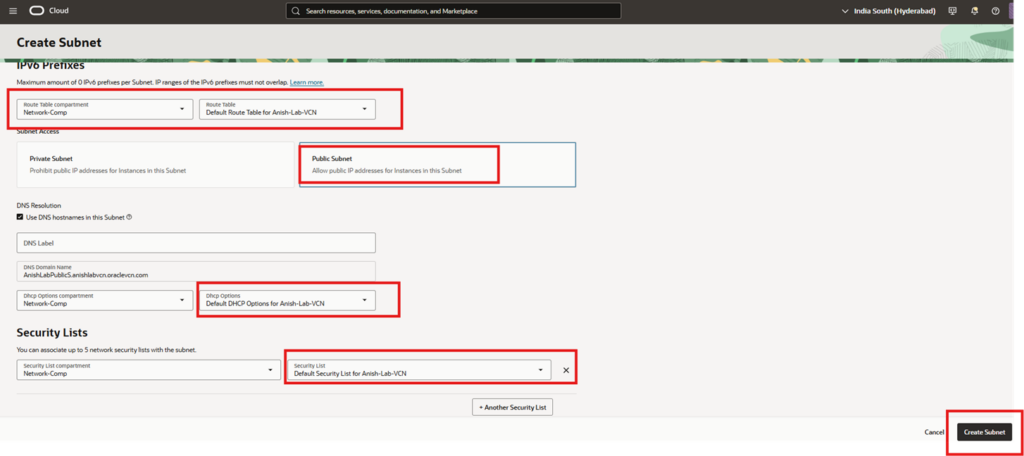
Step 7 — Associate Route Table
- Route Table Selection
- Route Table Compartment: Network-Comp
- Route Table: Anish-Lab-Public-RT
Step 8 — Set Subnet Access Type
Allow public IP addresses for instances in this subnet
Step 9 — DNS & DHCP Configuration
- Use DNS hostnames: Enabled
- DNS Label: Auto-generated
- DNS Domain: *.oraclevcn.com
- DHCP Options: Default DHCP Options for Anish-Lab-VCN
Automatically provides- DNS resolver, Search domain, Avoids manual OS-level network configuration.
Step 10 — Security List Association
Default Security List for Anish-Lab-VCN
- Ingress (incoming traffic)
- Egress (outgoing traffic)
Traffic will still be blocked if security rules don’t allow it. In production, prefer NSGs over Security Lists for finer control.
Step 11 — Create Subnet
Click Create Subnet
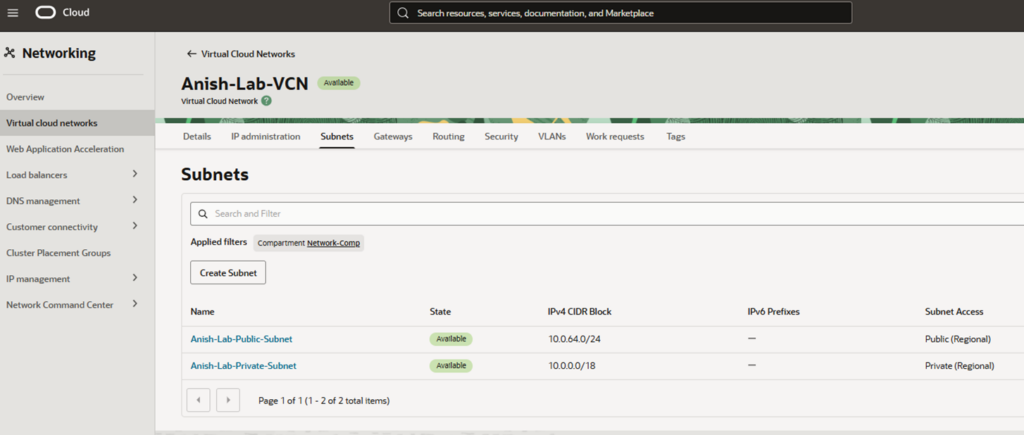
Subnet state: Available Subnet access: Public (Regional) CIDR: 10.0.64.0/24